- Home
- Cell Phones
- Guu-8

Categories: Cell Phones
Auto Clicker for Smart Phone, Phone Screen Tapper for Phone Apps Video Live Streaming Gadget Fast Click Simulation Finger Continuous Click for Live Broadcasts Likes, Games, Shopping, Reward Tasks
-
Bestseller rating (0.3)
$12.98
-
Highest Price
$12.98 -
Average Price
$12.98 -
Lowest Price
$12.98 -
Last Price Change
$0 -
Savings (%)
0% -
Savings ($)
$0.00
Price History
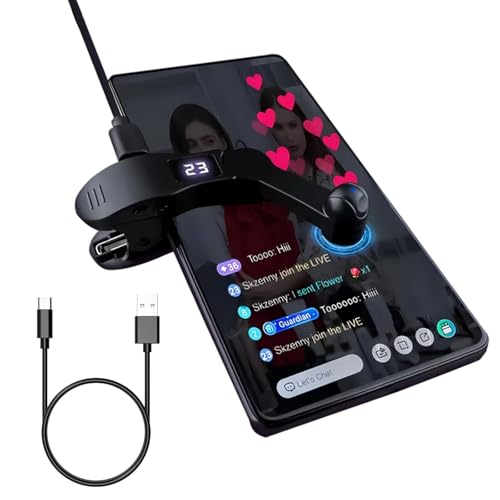
Advanced Silent OperationThe innovative auto-clicker for smartphone screens harnesses cutting-edge spatial mapping technology to transition from the archaic mechanical clicking. This modernization ensures silent functionality, eliminating any noise entirely and promising an elongated lifespan. With its commitment to groundbreaking techniques, it preserves phone screen integrity, delivering improved responsiveness and reliability.
Effortless OperationSimply attach the click head or use the screen clip to replicate automatic finger taps. Connecting the USB interface to a power source allows immediate use, liberating your hands. Ideal for gaming, live broadcasting, and task completion with efficiency.
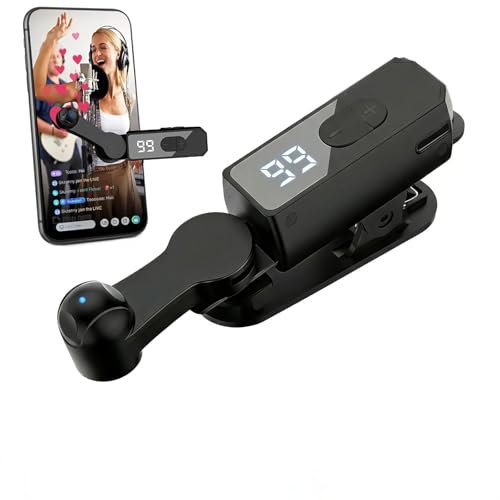
Customizable Clicking SpeedTailor your phone screen auto-clicker to suit your exact needs. Featuring 108 adjustable speed settings, you have the freedom to choose between an incredibly fast rate of 99 clicks per second or a more leisurely pace of just 1 click every 9 seconds. You can save your preferred speed and enjoy finger-like, irregular click patterns for an uninterrupted experience.
LED Display ConvenienceFeaturing an integrated LED digital display, this design offers visibility into the number of clicks for ease and convenience in operation. The use of an intelligent digital interface streamlines your experience, making it more user-friendly.
Instructions for UseActivate BOOT Mode - Begin by pressing the BOOT button to engage the device in BOOT status, where the screen will display a numerical count. Proceed by pressing the start button to initiate the clicking action, indicated by a flashing blue light. To modify the frequency while in BOOT mode, simply hold down the BOOT key for an extended adjustment.
NTOEThis product does not come with batteries and requires external power to operate. To use it, you will need to connect the USB interface to a compatible power source, such as a computer, USB power adapter, or power bank. Once connected, the product should power on and be ready for use.
-
Brand
Guulaiwod
-
Model
Guu-8
-
Bestseller rank
29
-
Bestseller rank change
-1
-
Bestseller rating
(0.3)